


How to Add Swipe Up to Instagram Story Fast by Using Linktree
The Instagram Swipe-Up Link: What It Is and How It Works Today
Want to add swipe up to an Instagram Story fast? Here’s the quick answer:
How to add a link to your Instagram Story (2026):
- Open Instagram and tap the + icon to create a new Story
- Capture or upload your photo or video
- Tap the sticker icon (the square smiley face) at the top of the screen
- Select the Link sticker from the sticker tray
- Paste your URL (such as a Linktree link) and customize the sticker text
- Place the sticker on your Story and tap Done
- Hit Share to publish
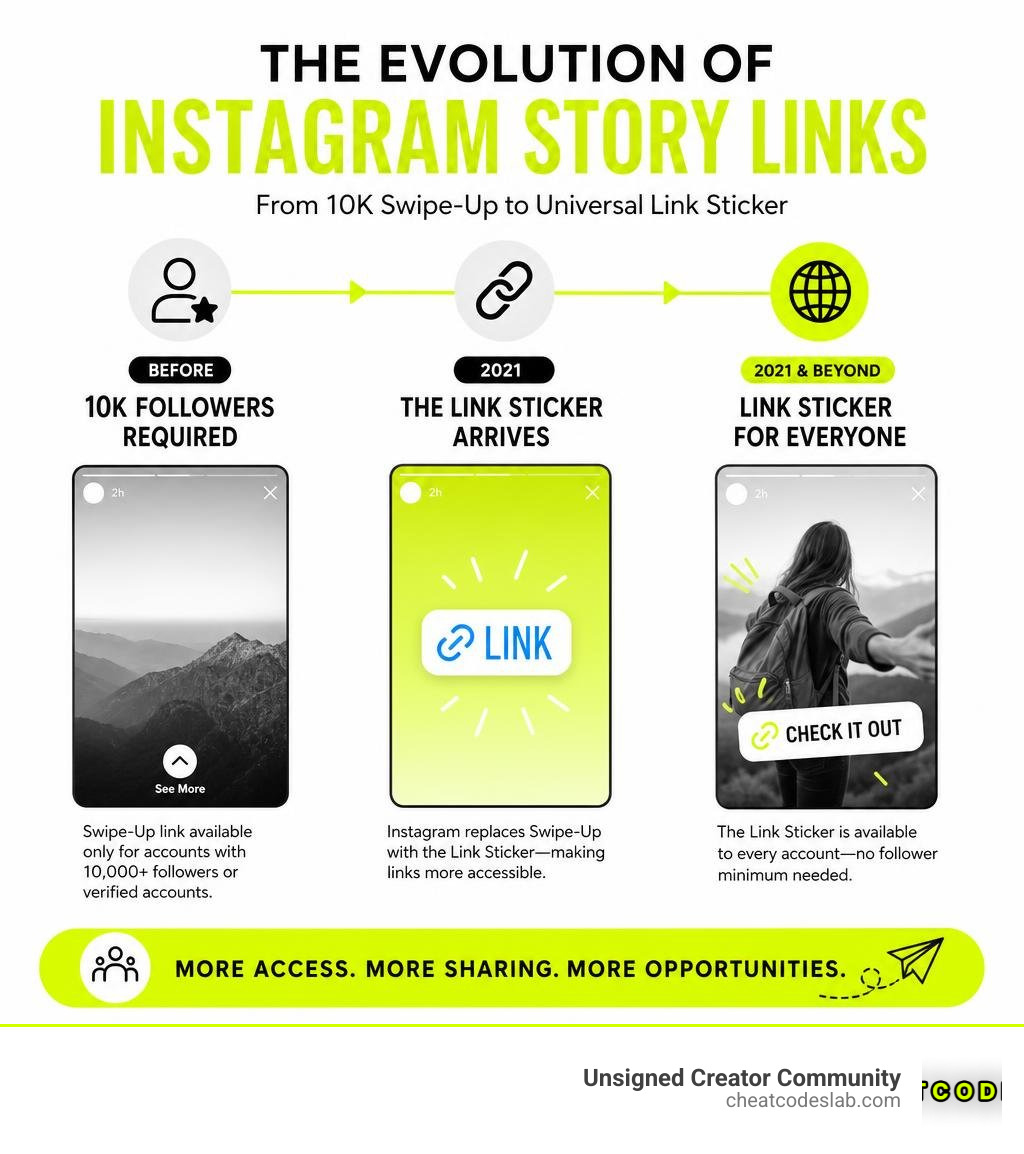
Good news: As of October 2021, Instagram replaced the old swipe-up feature with the Link Sticker — and it’s available to every account, no matter your follower count.
Instagram Stories are one of the most powerful tools for creators and marketers right now. Over 500 million people watch Instagram Stories every single day. And one-third of the most-viewed Stories on the platform are made by brands — not celebrities, not mega-influencers, brands.
That kind of reach is hard to ignore. But for years, the ability to add a clickable link to a Story was locked behind a wall: you needed 10,000 followers or a verified badge. For most creators, that meant watching traffic opportunities slip away.
That wall is gone now. The Link Sticker changed everything.
I’m digitaljeff — content strategist, filmmaker, and founder of CheatCodesLab — and I’ve spent the last 20+ years helping creators and brands build smarter content distribution strategies, including figuring out how to add swipe up to Instagram Story long before the tools made it easy. In this guide, I’ll show you exactly how to use it in 2026 to drive real traffic.
Key add swipe up to instagram story vocabulary:
How to Add Swipe Up to Instagram Story with Link Stickers
If you are still looking for the classic “swipe up” gesture, you might notice something is missing. The old upward-swipe motion was officially retired because the replacement offers a much better user experience.
With the classic swipe-up, viewers had to make a rigid gesture, and they couldn’t reply or react to the Story because the swipe-up field blocked the text box. The modern Link Sticker solves this. It gives you complete creative control, allowing you to place your link anywhere on the screen, change its size, and customize the call-to-action (CTA) text.
However, if you recently hit your follower goals and are wondering why the feature isn’t working as expected, you aren’t alone. Many creators find themselves in a situation where they have 10k followers on Instagram but no swipe up functionality, simply because they are looking for the old link icon instead of using the sticker tray.
According to a guide on Why Your Instagram Stories Swipe Up Strategy Needs an Upgrade – eOptimize, upgrading your approach to modern link stickers can dramatically boost your click-through rates (CTR) and overall engagement.

What Happened to the Classic Swipe-Up Feature?
In August 2021, Instagram made a platform-wide shift. They retired the classic swipe-up link and introduced the Link Sticker.
Historically, the swipe-up feature was highly exclusive. Only verified accounts or business profiles with over 10,000 followers could access it. This limitation left smaller businesses, rising creators, and personal brands in the dark.
By replacing the swipe-up with the Link Sticker, Instagram leveled the playing field. Today, whether you have 10 followers or 10 million, you can share external links. To learn more about this transition and the technical prerequisites, check out the breakdown on How to Add Swipe Up Link on Instagram Story – TechBloat.
Step-by-Step: How to Add Swipe Up to Instagram Story Today
Ready to get those clicks? Here is the exact, step-by-step process to add a link to your Story:
- Create Your Content: Open the Instagram app, swipe right to open the Story camera, and take a photo, record a video, or upload media from your camera roll.
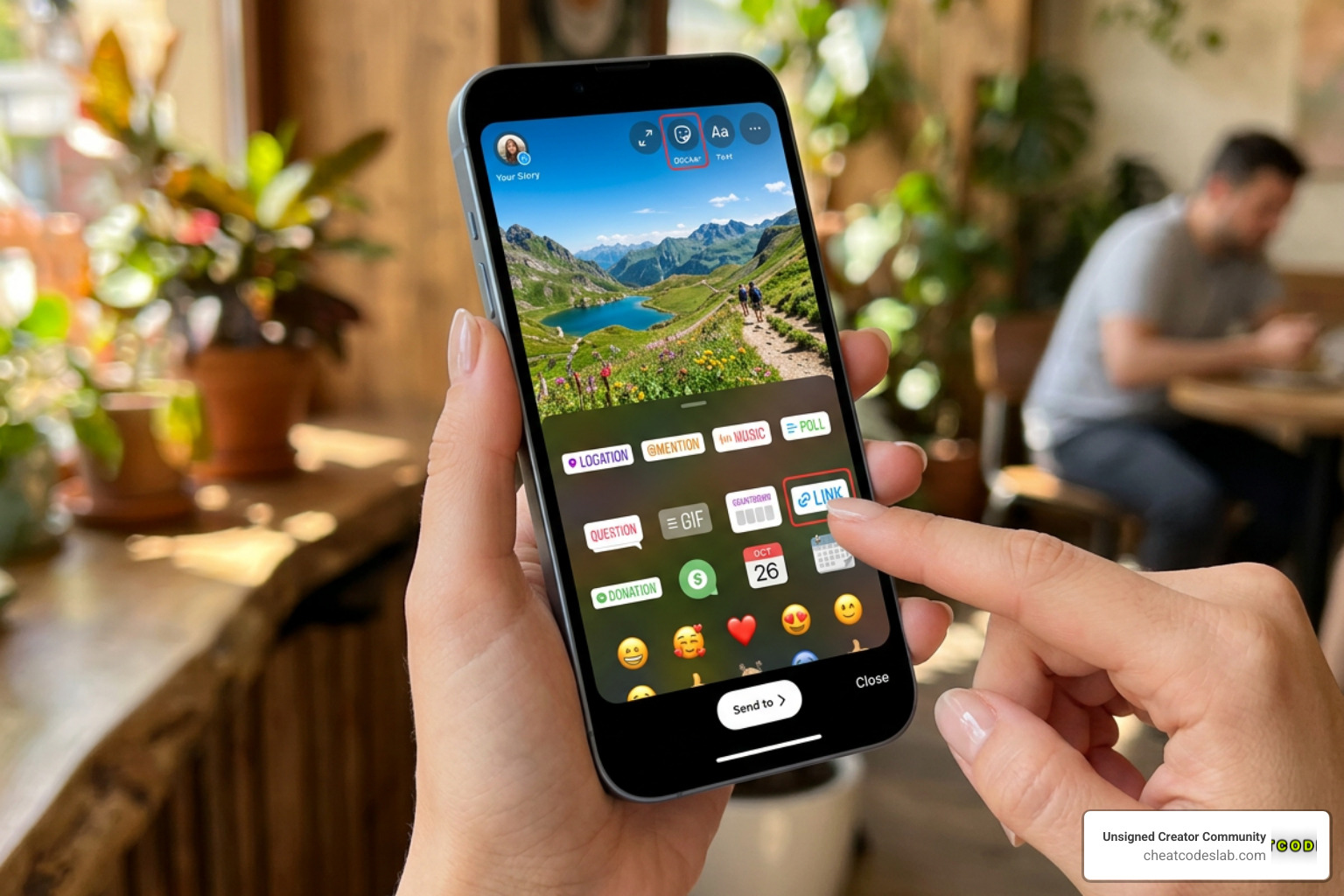
- Open the Sticker Tray: Tap the Sticker icon at the top of your screen (the square, smiling face).
- Select the Link Sticker: Scroll down and select the sticker labeled Link.
- Enter Your URL: Paste the destination link (e.g., your Linktree URL) into the URL field.
- Customize Your Sticker Text: Tap Customize sticker text and enter a compelling CTA like “Get the Recipe,” “Shop the Sale,” or “Read More.”
- Position and Style: Tap Done. Drag the sticker to place it in an eye-catching spot. You can tap the sticker to cycle through different color variations (blue, white, black, or translucent).
- Publish: Tap the Your Story button to share it with your audience.
For a deeper dive into customizing these designs, you can read How to add a link to an Instagram Story (and customize it). Also, don’t forget to pair your link with engaging captions; you can master this with our guide on How To Add Text To Instagram Story In 5 Easy Steps.
Bypassing Limits: How to Add Swipe Up to Instagram Story Without 10k Followers
Even though the Link Sticker is available to everyone, some creators still face limitations. For instance, new accounts (under 7–14 days old) or accounts with recent community guideline strikes may find the sticker temporarily missing.
Fortunately, there are creative workarounds to drive traffic without relying solely on the direct Link Sticker:
- The Linktree & Bio Strategy: You can direct users to the single link in your bio. Use interactive elements in your Story to point them there.
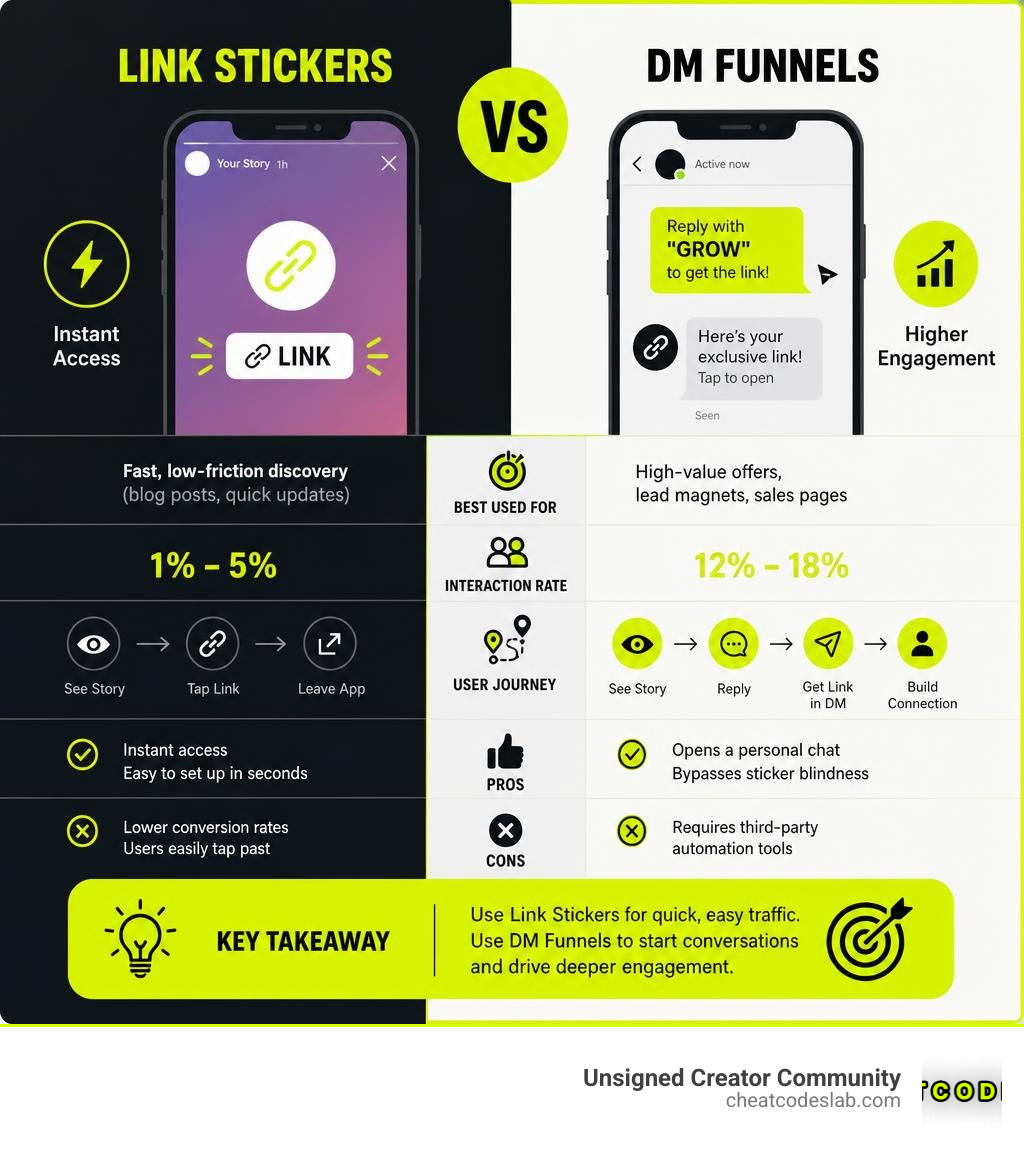
- The DM Automation Funnel: Instead of a link sticker, ask your audience to reply to your Story with a specific keyword (e.g., “GROW”). You can then use automation tools to instantly send them the link via Direct Message. This method often sees much higher engagement because it opens a direct line of communication.
- Sharing Feed Posts: You can share a static post or Reel directly to your Story to build anticipation, which we cover in our tutorial on ig share post to story.
- The Legacy IGTV Hack: If you want to explore older creative workarounds, some creators historically used IGTV video descriptions to bridge the gap, as detailed on How to add SWIPE UP LINK to Instagram Story WITHOUT 10k Followers – VidzMak.
For a complete look at troubleshooting missing stickers and fixing account limitations, refer to Instagram Story Link Sticker: Setup, Limits, and Fixes.
Best Practices to Customize and Optimize Your Story Links
Getting the link onto your Story is only half the battle; the real challenge is getting people to actually tap it.
To maximize your click-through rates, consider these optimization strategies:
- Deliver Value First: Never lead with a cold sales pitch. Build a narrative across multiple slides. If you are sharing a tutorial, use our guide on Beyond One Mastering Multi Photo Instagram Stories to build tension before revealing the link on the final slide.
- Make it Accessible: Since 84% of buyers have been persuaded to purchase after watching a brand’s video, video Stories are incredibly effective. However, many users watch Stories on mute. Use the Caption Sticker Instagram to automatically transcribe your words so silent viewers don’t miss your CTA.
- Add Sensory Appeal: Music and sound effects keep viewers on your slides longer. Learn how to Add Audio To Instagram Story or read our complete guide on How To Add Audio To Instagram Story The Right Way to select trending audio that boosts algorithmic reach.
- Use Visual Cues: Don’t let your link blend into the background. Use high-contrast colors, animated GIF arrows pointing at the sticker, or circle the sticker using the draw tool. You can find visual inspiration on Instagram Story Swipe Up Examples: Complete Guide for 2025 | Digital Thrive US.
Here is a quick comparison of the two main strategies for driving traffic from Stories:
| Strategy | Best Used For | Typical Interaction Rate | Pros | Cons |
|---|---|---|---|---|
| Link Sticker | Fast, low-friction discovery (e.g., blog posts, quick updates) | 1% – 5% | Instant access; easy to set up in seconds | Lower conversion rates; users easily tap past |
| DM Automation Funnel | High-value offers, lead magnets, and sales pages | 12% – 18% | Opens a personal chat; bypasses sticker blindness | Requires third-party automation tools |
If you are running collaborative campaigns, you can also leverage co-marketing tools. Learn how to share the spotlight using our Guide To Add Collaborator On Instagram.
Conclusion: Elevate Your Instagram Strategy
Learning how to add swipe up to Instagram Story templates using modern Link Stickers is one of the fastest ways to turn your social media presence into a traffic-generating machine. By combining the universal accessibility of link stickers with optimized landing pages like Linktree, you can seamlessly guide your audience from casual viewing to active engagement.
At CheatCodesLab, we specialize in providing certified AI tools and cheat codes for content marketing and SEO, ensuring top-tier solutions for online creators and agencies. Whether you want to master social media traffic or scale your search rankings, we have the resources to help you succeed.
Ready to take your social media growth to the next level? Explore our expert guides and tools on the CheatCodesLab Instagram Features Pillar Page today!


About the author


How to Archive Posts on Instagram in 4 Easy Steps
Master archiving on Instagram in 4 easy steps to organize your profile and protect your content.

Beginner’s Guide to 10k free instagram followers app
Discover how a 10k free instagram followers app works, its risks, and safe organic growth strategies for real engagement in 2026.

Beginner’s Guide to Best Instagram Report App
Discover the best Instagram report app for real-time analytics, automated reports, and data-driven decisions in 2026.
How to Master Advanced SEO Search Techniques in 7 Steps
Master advanced search techniques in SEO with 7 proven steps to boost rankings, technical audits, and organic traffic.

Cheat Sheet to the Best Business Apps
Discover the best business apps to streamline operations, boost productivity, and scale your business in 2026.

How to Get Instagram Followers Free APK in 5 Steps
Discover how instagram followers free apk 2026 download works and learn safe organic growth strategies instead of risky third-party tools.
Related

Stop the Scroll with the Best Instagram Growth Service Reviews
Discover the Best Instagram growth service in 2026: organic, human-powered strategies, AI targeting, safety tips & reviews to boost followers fast.

Carousel App for Instagram: Which One Should You Choose?
Find the best carousel app for Instagram! Compare features, AI vs. manual, and customization to elevate your content strategy.

From Zero to Hero: Apps That Actually Boost Your Instagram Following
Discover the best app to boost Instagram followers! Learn how AI, analytics, and safe strategies can skyrocket your growth from zero to hero.

Fixing the Web, One Broken Link at a Time with Ahrefs
Boost SEO with expert ahrefs broken link building. Learn to find, vet, and earn high-quality backlinks using Ahrefs' powerful tools.

Unlock Thousands of Instagram Followers with bigtakip.com Your Secret Weapon
Explore bigtakip com followers & their risks. Discover why organic growth builds real, lasting Instagram success. Choose wisely.

Unleash Your Inner Content Creator with These AI Tools
Unleash creativity & boost productivity. Discover the best ai content creation tools to save time, cut costs, and enhance quality.