

Cheat Sheet to the Best Business Apps
Why the Best Business Apps Are Essential in 2026
If you’re looking for a quick answer, here are the top business apps most small business owners rely on in 2026:
| Category | Best App | Why It Stands Out |
|---|---|---|
| Accounting | Wave | Free, unlimited invoicing, cloud sync |
| Communication | Slack | Team messaging, file sharing, integrations |
| CRM | HubSpot CRM | Free, unlimited users, up to 1M contacts |
| Project Management | ClickUp | AI-powered, all-in-one workspace |
| Payments | Square | Simple setup, low transaction fees |
| Team Collaboration | monday.com | Visual workflows, 120K+ teams |
| Invoicing & Finance | Wave Mobile | Receipt scanning, auto bank sync |
| Business Messaging | WhatsApp Business | 1B+ downloads, 4.7-star rating |
Finding the best business apps can make or break how well you run your operations day to day. Whether you’re a solo freelancer or managing a growing team, the right apps save time, cut costs, and keep everything organized — from invoices to customer conversations.
The challenge? There are hundreds of options out there. Some are free. Some charge per user. Some do everything. Some do one thing really well. It’s easy to waste hours testing tools that don’t actually fit your workflow.
One real-world pain point that comes up constantly: a business owner loses all their data when their phone is damaged — simply because their app didn’t have cloud sync or multi-device login. That’s the kind of problem the right app stack prevents from day one.
This guide cuts through the noise and breaks down the apps worth your time — by category, by budget, and by what actually works in 2026.
I’m digitaljeff — tech entrepreneur, content strategist, and founder of CheatCodesLab — and over 20 years of building and running businesses from the ground up, I’ve tested more best business apps than I can count, from early-stage startups to scaling multi-location operations. Let’s get into the ones that actually move the needle.
The Best Business Apps for Modern Operations
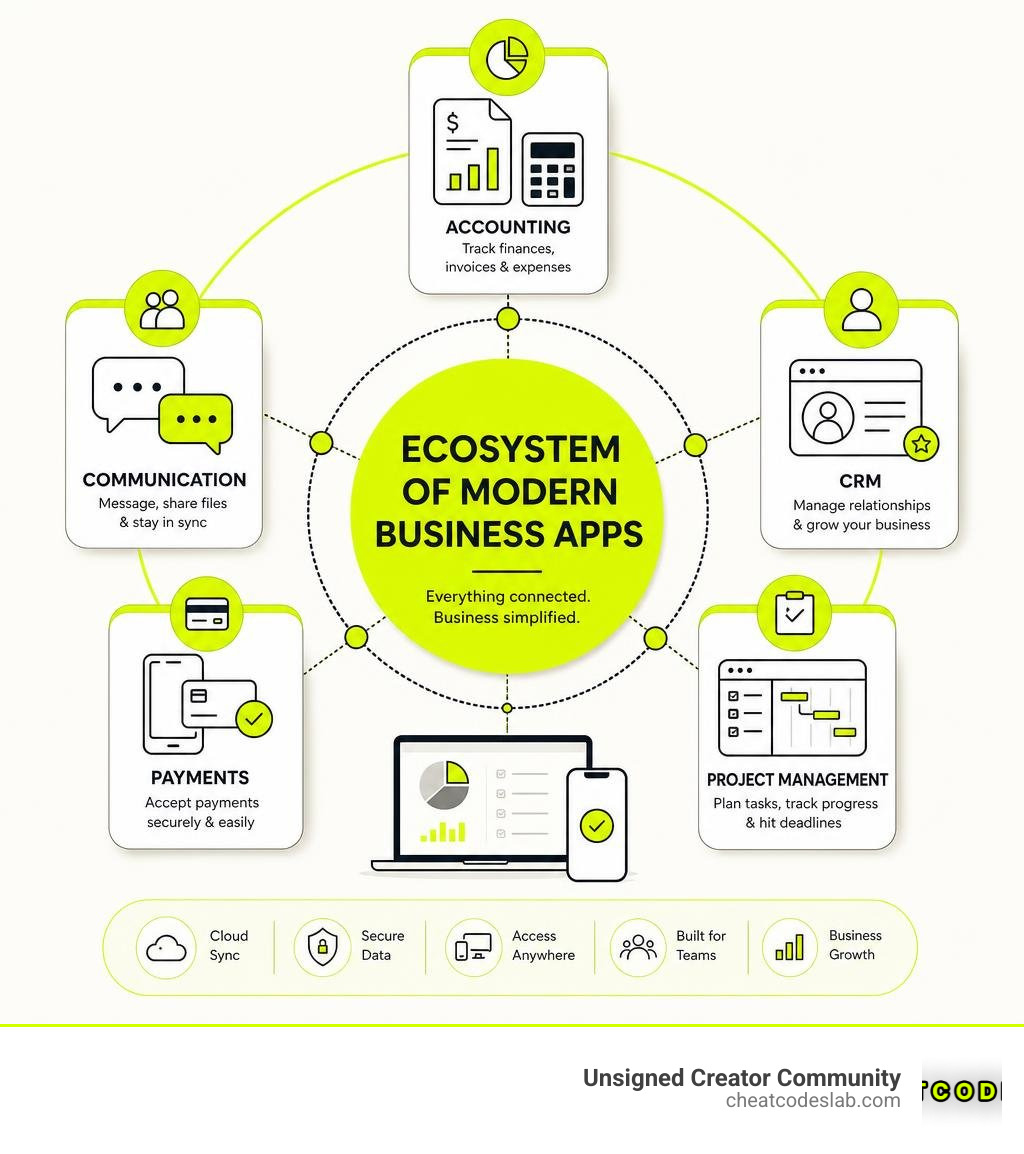
Running a modern business means staying agile. Traditional desktop-only systems are rapidly declining because modern teams demand flexibility, remote accessibility, and real-time updates. By utilizing the best business apps, we can transition from messy, fragmented workflows to streamlined, automated operations.
To help you choose, we have put together a quick comparison of how the top contenders stack up across user sentiment and core capabilities:
| App | Primary Use Case | Key Features | User Rating (Average) |
|---|---|---|---|
| Wave | Accounting & Invoicing | Unlimited invoicing, receipt OCR scanning, bank sync | 4.6/5 stars |
| WhatsApp Business | Customer Communication | Quick replies, catalog showcase, automated away messages | 4.7/5 stars |
| monday.com | Team Collaboration | Visual boards, automated workflows, AI task execution | 4.7/5 stars |
| ClickUp | Productivity & Projects | Doc collaboration, AI Super Agents, custom dashboards | 4.7/5 stars |
| Salesforce CRM | Enterprise Customer Relations | 360-degree customer view, Agentforce AI, deep analytics | 4.5/5 stars |

Essential Categories of the Best Business Apps
To build a reliable digital ecosystem, we must look at the vital pillars of business administration. Here is a breakdown of the essential categories and the apps that dominate each space in 2026.
1. Accounting and Financial Management
You didn’t start your business to spend hours handling bookkeeping. Having a cloud-based financial hub ensures you are always tax-ready.
- Wave: This is a game-changer for freelancers, consultants, and sole proprietors. It offers unlimited invoices, customers, and transactions for free. To manage your money on the go, the Wave: Small Business Software – Apps on Google Play companion app allows you to capture receipts instantly using optical character recognition (OCR) and syncs everything directly to the web platform. If you prefer working on a laptop, you can access the full suite via Wave: Small Business Software – Wave Financial.
2. Communication and Business Messaging
Keeping your team and your customers in the loop is the single most important factor for retention and smooth operations.
- WhatsApp Business: With over 1 billion downloads and a 4.7-star rating from more than 22 million reviews, WhatsApp Business – Apps on Google Play is the undisputed king of direct customer communication. It allows you to set up a professional profile, create a product catalog, and set up automated quick replies.
- Slack: The ultimate internal communication tool. It helps teams move away from cluttered email chains by organizing conversations into dedicated channels. The free tier keeps your team connected, though it limits your visible message history.
3. Project Management and Productivity
When tasks are scattered across spreadsheets and sticky notes, things get dropped. Consolidating your work into a single workspace is key.
- ClickUp: Positioned as the “software to replace all software,” ClickUp™ | Maximize productivity • Software, AI, and humans converge brings tasks, docs, chat, and goals into one unified, AI-driven platform. Its advanced AI features act like extra virtual team members, summarizing meetings and automating repetitive workflows.
- monday.com: If your team thrives on highly visual layouts, monday.com – AI Work Platform – Apps on Google Play is fantastic. Used by over 120,000 teams, it combines customizable Kanban boards, Gantt charts, and automated notifications to keep everyone aligned.
- Trello & Asana: Excellent alternatives for simpler task tracking. Trello is highly intuitive with its drag-and-drop card system (though the free tier has a 10 MB limit on file attachments), while Asana excels at mapping out complex project timelines for teams.
4. Customer Relationship Management (CRM)
A great CRM provides a single source of truth for all customer interactions, helping your sales and support teams work in perfect harmony.
- Salesforce CRM: For scaling enterprises, Salesforce CRM: Try The World’s #1 Agentic CRM | Salesforce provides a complete, 360-degree view of your customer journey. Its cutting-edge AI agents can execute real-world tasks across sales, service, and marketing departments.
- HubSpot CRM: A favorite for growing small businesses because its free plan supports unlimited users and up to 1 million contacts, making it incredibly easy to adopt without financial risk.
- Zoho CRM: Another strong contender, especially for very small teams, as its free version accommodates up to three users with robust contact management features.
5. Payments, Marketing, and Lead Generation
Accepting payments seamlessly and driving new leads are the lifeblood of cash flow.
- Square & PayPal: Square is the go-to for retail and mobile service providers, turning any mobile device into a Point of Sale (POS) system with simple transaction-based fees. PayPal remains a global standard for digital checkout and invoice payments.
- Mailchimp: Perfect for email automation. Its free tier supports up to 500 contacts and 1,000 sends per month, allowing you to build newsletters and targeted campaigns easily.
- Skrapp.io: A powerful tool for B2B outreach teams, helping verify professional email addresses and integrate directly with LinkedIn for lead generation.
For those looking to expand their promotional tech stack, check out our guide on the best Marketing Tools to pair with these systems.
How to Choose the Best Business Apps for Your Budget
When building your software stack, we always recommend starting with a clear budget strategy. Running a business doesn’t mean you need to lock yourself into expensive enterprise contracts from day one.

Here are our top best practices for selecting budget-friendly business tools:
- Audit Your Pain Points First: Don’t download apps just because they look shiny. Choose one or two tools that solve your most immediate daily bottleneck (e.g., manual invoicing or messy team communication).
- Maximize Free Tiers: Many of the best business apps offer incredibly generous free plans. For example, HubSpot CRM gives you unlimited users for free, and Wave handles your core accounting without monthly subscription fees.
- Understand the “Freemium” Trap: Some apps offer free plans but restrict critical features like cloud sync, multi-device access, or team collaboration. Always check what is included in the free tier before migrating your entire operational data.
- Watch Out for Transaction Fees: Free payment and invoicing apps often make their money on the back-end through credit card processing percentages. Make sure these transactional costs align with your profit margins.
If you are looking to integrate cutting-edge, budget-friendly automation, explore our curated list of Free AI Software.
Key Integrations and Security Considerations
A common mistake small businesses make is running “software islands” — tools that don’t talk to each other. When your apps are disconnected, you end up wasting hours manually copying data from your payment processor into your accounting software or CRM.
When choosing your tools, ensure they integrate seamlessly with core suites like Google Workspace or Microsoft 365. For instance, choosing Google Drive (which offers 15 GB of free storage) or Microsoft OneDrive (providing 5 GB free, or 1 TB with Microsoft 365) makes file sharing across Slack or ClickUp completely effortless.
Security, Privacy, and Data Safety
As we handle sensitive customer details and financial transactions, security is non-negotiable. Here is what we must evaluate:
- Cloud Sync & Backups: Avoid apps that store data strictly on a single physical device. If your phone gets damaged or stolen, your entire business history could be lost. Choose apps with automatic, encrypted cloud backups.
- Encryption Standards: Ensure your financial and communication apps use 256-bit SSL encryption for data transfers.
- Compliance: If you handle card payments, your processors must be certified PCI-DSS Level 1 Service Providers to ensure secure transaction environments.
To keep your digital assets safe from modern threats, take a look at our breakdown of the Top 5 AI Risk Management Software for 2026.
Scaling Your Business from One to Multiple Locations
As your business grows from a single-person operation to multiple employees or physical locations, your software needs will change. The tools you choose today should support where you want to be tomorrow.
- Multi-Device Access: Your team needs to access the same real-time data whether they are on a laptop at headquarters, an iPad in the field, or a smartphone on the go.
- Centralized Communication: Avoid fragmenting your team. Using unified platforms like Slack or WhatsApp Business (which allows up to five connected devices on its free tier, or ten with Meta Verified) keeps your customer support consistent across multiple locations.
- Unified Dashboards: Use tools like monday.com or ClickUp to build high-level dashboards. This allows management to monitor task completion, timelines, and bottlenecks across different branches without micromanaging.
To supercharge your growth campaigns as you scale, explore the Essential AI Software for Digital Marketing.
Conclusion: Scaling Your Operations with the Right Tools
Finding the best business apps isn’t about collecting as many tools as possible; it’s about choosing a few powerful, secure, and integrated platforms that do the heavy lifting for you. By automating your invoicing with Wave, centralizing your customer chats with WhatsApp Business, and organizing your projects with ClickUp or monday.com, you free up valuable time to focus on what truly matters: growing your business.
As you scale your operations, staying ahead of digital trends is vital. We at the Unsigned Creator Community, in partnership with CheatCodesLab, specialize in providing certified AI tools and strategic cheat codes to help online creators, agencies, and small businesses thrive.
Ready to take your operational efficiency to the next level? Explore our library of cutting-edge CheatCodesLab AI Apps and start optimizing your workflow today!


About the author


How to Archive Posts on Instagram in 4 Easy Steps
Master archiving on Instagram in 4 easy steps to organize your profile and protect your content.

Beginner’s Guide to 10k free instagram followers app
Discover how a 10k free instagram followers app works, its risks, and safe organic growth strategies for real engagement in 2026.

Beginner’s Guide to Best Instagram Report App
Discover the best Instagram report app for real-time analytics, automated reports, and data-driven decisions in 2026.
How to Master Advanced SEO Search Techniques in 7 Steps
Master advanced search techniques in SEO with 7 proven steps to boost rankings, technical audits, and organic traffic.

Cheat Sheet to the Best Business Apps
Discover the best business apps to streamline operations, boost productivity, and scale your business in 2026.

How to Get Instagram Followers Free APK in 5 Steps
Discover how instagram followers free apk 2026 download works and learn safe organic growth strategies instead of risky third-party tools.
Related
Beginner’s Guide to Best Instagram Report App
Discover the best Instagram report app for real-time analytics, automated reports, and data-driven decisions in 2026.

The Ultimate Guide to AI Generated SEO Content Tools
Master ai generated seo content with proven tools, Google guidelines, and GEO strategies that boost rankings and drive real results.

The Complete Guide to 1k Followers App
Discover how a 1k followers app can help you reach TikTok Live and boost Instagram growth fast with safe, organic strategies.

The Ultimate Guide to Best Local SEO Tools
Discover the best local seo tools to boost visibility, manage citations, and optimize your Google Business Profile in 2026.

Backlink Building Tool Survival Guide
Discover top backlink building tool strategies: Compare Ahrefs, Semrush, AI outreach like Linkee, free options, and penalty recovery tips for 2026 SEO success.

Automate SEO Reporting to Save Your Sanity
Automate SEO reporting to slash 45 hours of manual work to 30 minutes. Save costs, boost accuracy, and scale with AI dashboards in 2026.