



How to Add Collaborator to Instagram Reel in Minutes
What It Means to Add a Collaborator to an Instagram Reel (And Why It Works)
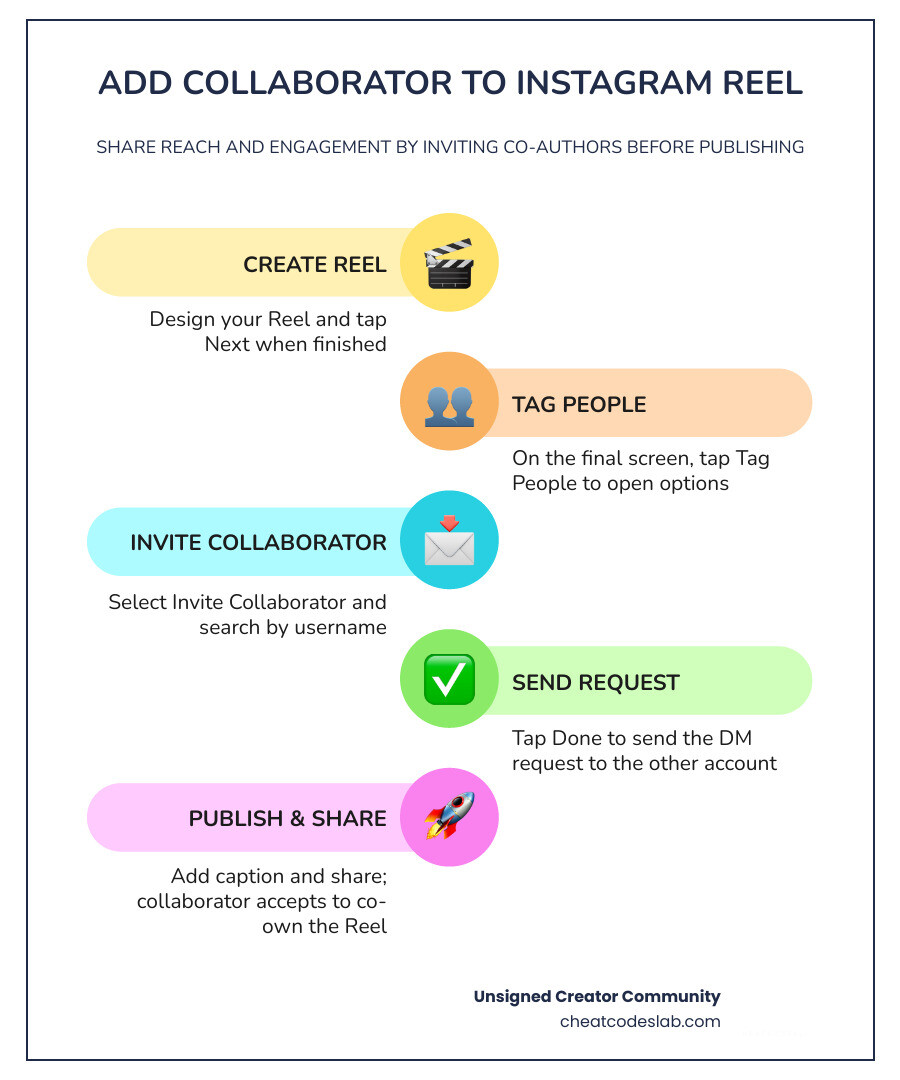
Knowing how to add collaborator to Instagram Reel posts is one of the fastest ways to double your content’s reach without posting twice. Here’s the quick answer:
How to add a collaborator to an Instagram Reel:
- Create your Reel and tap Next
- On the final screen, tap Tag People
- Select Invite Collaborator
- Search for the account by username
- Tap their profile and tap Done
- Add your caption and tap Share
The invited collaborator will receive a request in their DMs. Once they accept, the Reel appears on both profiles and all engagement — likes, comments, views — is pooled into one shared count.
Already posted? You can still add a collaborator. Go to the Reel, tap the three dots, select Edit, then tap Tag People to invite a collaborator retroactively.
Instagram introduced the Collab feature in 2021, and it has since become one of the most effective tools for organic reach on the platform. Unlike a simple tag, a collaborator invite gives the other account co-author status — meaning the Reel shows up on their grid, reaches their audience, and shares the same engagement thread. Research shows that Reels using the Collab feature see up to a 48% boost in engagement compared to regular posts, because both creators’ audiences are combined into a single engagement pool.
I’m digitaljeff, a content strategist with 20+ years of experience helping creators and brands scale their distribution on platforms like Instagram — including mastering features like how to add collaborator to Instagram Reel posts for maximum reach. In this guide, I’ll walk you through every step, from pre-publish invites to retrospective collaboration and workflow tips for doing it at scale.
Basic add collaborator instagram reel terms:
How to Add Collaborator to Instagram Reel: Step-by-Step Guide

Setting up a collaborative post is incredibly straightforward once you know where the buttons are hidden. The key is understanding that collaboration is built directly into the Reel’s metadata. This isn’t just cosmetic; it changes how the Instagram algorithm distributes the video.
Why You Should Add Collaborator Instagram Reel Posts
If you are still just tagging your partners in the caption or using basic image tags, you are leaving massive amounts of traffic on the table. According to Instagram’s own internal data, collaborative posts receive 34% more engagement than regular posts. When you look at video specifically, Reels using Collabs enjoy an incredible 48% engagement boost.
Why does this happen? It comes down to how the Instagram algorithm treats combined engagement pools. Instead of starting from zero on two separate accounts, all the likes, comments, shares, and views are funneled into a single post. This rapid influx of engagement “tricks” the algorithm into thinking your Reel is an instant viral hit, pushing it to the Explore page and Reels feed much faster.
For creators just starting out, utilizing this feature alongside a solid Instagram Reels For Beginners strategy is the fastest way to gain traction. It allows you to leverage an established creator’s audience pool to validate your own content. For brands, it’s a direct line to monetizing Instagram Reels through seamless influencer partnerships.
By combining forces, you bypass the typical organic reach limits. To learn more about the mechanics of collaborative reach, check out this How to Collab on Instagram: A Complete Guide (2026). Once you have the reach, you can use creative content ideas for reels to keep those new followers hooked.
How to Add Collaborator Instagram Reel Invites Before Publishing
If you are launching a fresh piece of content and want to invite a partner from day one, follow these steps in your Instagram mobile app:
- Create and Edit Your Reel: Open Instagram, tap the + icon, select Reel, and record or upload your video. Apply your edits, music, and filters, then tap Next.
- Access the Tagging Menu: On the final sharing screen (where you write your caption), tap the Tag People option.
- Invite Your Partner: Instead of tapping the image to add a standard tag, look below the media preview and tap Invite Collaborator.
- Search and Select: Search for the exact handle of the account you want to partner with. Tap their name when it appears.
- Finalize and Share: Tap Done in the top right corner, finish writing your caption, and tap Share.
For a visual walkthrough of this process, you can watch the How to Use Instagram Collabs Feature (Video Tutorial) – Later. Once published, the invite will be sent directly to your partner’s direct messages. The post will only show up on your profile until they accept. For more details on this workflow, see How to Add Collaboration in an Instagram Post.
Can You Add a Collaborator After Posting?
For years, the biggest frustration with Instagram Collabs was that if you forgot to send the invite before hitting “Share,” you were out of luck. You had to delete the Reel, lose your initial views, and re-upload the entire thing.
Fortunately, Instagram rolled out a game-changing update: retrospective collaborator invites. You can now invite collaborators to your posts and Reels after they have already been published.
Here is how to add a collaborator to an existing Reel:
- Go to your profile grid and open the published Reel.
- Tap the three dots (options menu) in the bottom right corner.
- Tap Edit.
- Tap the Tag People button on the bottom left of the video preview.
- Select Invite Collaborators and search for the account you want to add.
- Tap Done and save your changes.
This metadata integration allows you to revive older content or correct administrative mistakes instantly. If you need a deep dive into troubleshooting this specific workflow, read this guide on How to add collaborator on instagram after posting reel or explore our quick-fix resource on Add Collaborator Instagram After Posting.
Accepting Invites and Troubleshooting Limitations
For a collaboration to work, the invited account must accept the request. The invite arrives as a DM notification. The recipient simply needs to tap Review Invite and select Accept.
However, there are a few technical rules and limitations you must keep in mind to avoid errors:
| Feature | Collaborative Post | Standard Tagging |
|---|---|---|
| Grid Visibility | Appears on both creators’ profile grids | Only appears on the original creator’s grid |
| Engagement Pool | Shared (likes, comments, views are combined) | Separate (only original post gets metrics) |
| Maximum Limit | Up to 5 collaborators per post | Up to 15 tags per post |
| Acceptance Window | Must accept within 7 days | No acceptance required |
| Account Privacy | Public accounts work best; private accounts have heavy restrictions | Works on all account types |
If you are experiencing issues where the “Invite Collaborator” button is missing, it is usually due to one of these common causes:
- Account Privacy: Private accounts cannot collaborate with accounts that do not follow them. For the best experience, both accounts should be public or professional profiles.
- App Version: Ensure your Instagram app is updated to the latest 2026 version.
- Regional Restrictions: Some features roll out gradually across different countries.
To understand the boundaries of the system, consult the How to Make a Collab Post on Instagram: Complete Guide (2026) and the [2026 Guide] How to Add Collaborators on Instagram for D2C – DEV Community.
Maximizing Your Reach and Streamlining Workflows

Simply knowing how to press the buttons isn’t enough to build an audience. To make the most of this feature, you need a strategic approach to selecting partners and managing your creative assets.
Best Practices for Choosing the Right Collaborators
When deciding who to add collaborator to Instagram Reel posts with, look beyond follower counts. The secret to explosive growth is audience alignment and engagement quality.
Here are three rules we live by:
- Audience Overlap: Partner with creators whose target audience naturally aligns with yours, but who aren’t direct competitors. For example, a fitness trainer collaborating with a healthy meal-prep brand.
- Healthy Engagement Rates: Aim to collaborate with accounts that maintain a combined engagement rate of over 4%. High follower counts with zero comments won’t help your algorithm score.
- Attribution Integrity: Ensure the collaboration feels authentic. The video should clearly showcase both parties’ contributions so viewers on both sides feel compelled to engage.
For more tips on optimizing your video performance, check out our guide on Best Practices Instagram Reels and learn the secrets behind how do you make a reel go viral.
Scaling Your Short-Form Video Strategy
For brands and agencies, managing multiple collaborations manually can quickly turn into a headache. Between chasing down creators to accept invites and tracking split analytics, it is easy to lose momentum.
At CheatCodesLab, we specialize in providing certified AI tools and cheat codes for content marketing and SEO, ensuring top-tier solutions for online creators and agencies looking to scale. By automating your video workflows and integrating smart messaging tools, you can manage campaigns with dozens of creators simultaneously.
To build a sustainable workflow, you need a robust short form reels strategy that treats collaborations as a systematic campaign rather than a one-off experiment. Combining these strategies with the latest Instagram features allows you to stay ahead of the competition.
If you want to take your social automation a step further, consider using ChatGPT for social media to draft collaborative pitches, or leverage the API Messenger Instagram to automatically follow up on pending collaborator invites.
Ready to unlock the full potential of your social channels? Discover our complete suite of creator tools and growth strategies on our Instagram Features Hub and start scaling your reach today!


About the author

How to Archive Posts on Instagram in 4 Easy Steps
Master archiving on Instagram in 4 easy steps to organize your profile and protect your content.

Beginner’s Guide to 10k free instagram followers app
Discover how a 10k free instagram followers app works, its risks, and safe organic growth strategies for real engagement in 2026.

Beginner’s Guide to Best Instagram Report App
Discover the best Instagram report app for real-time analytics, automated reports, and data-driven decisions in 2026.
How to Master Advanced SEO Search Techniques in 7 Steps
Master advanced search techniques in SEO with 7 proven steps to boost rankings, technical audits, and organic traffic.

Cheat Sheet to the Best Business Apps
Discover the best business apps to streamline operations, boost productivity, and scale your business in 2026.

How to Get Instagram Followers Free APK in 5 Steps
Discover how instagram followers free apk 2026 download works and learn safe organic growth strategies instead of risky third-party tools.
Related
How to Archive Posts on Instagram in 4 Easy Steps
Master archiving on Instagram in 4 easy steps to organize your profile and protect your content.

Beginner’s Guide to Best Search Engine Optimization SEO
Master best search engine optimization SEO with this beginner's guide covering on-page, technical, and AI strategies for higher rankings.

Ultimate Checklist for Social Media Marketing Agency
Discover the ultimate checklist for choosing a social media marketing agency that drives real ROI and growth.

Hot Summer Caption Ideas That Spark Engagement
Discover hot summer caption ideas that boost engagement, from short aesthetic lines to funny unhinged vibes and beach photo dumps.

How to Add Text to Instagram Story in 5 Easy Steps
Learn how to add text to Instagram Story in 5 easy steps with our native tips and creative text hacks for better engagement.

How to Add Audio to Instagram Story the Right Way
Learn how to add audio clip in Instagram Story using built-in music or your own file with this step-by-step guide.
