



How to See Who Doesn’t Follow You Back on Instagram in 5 Easy Steps
The Real Reason Your Instagram Following Count Doesn’t Match Your Followers
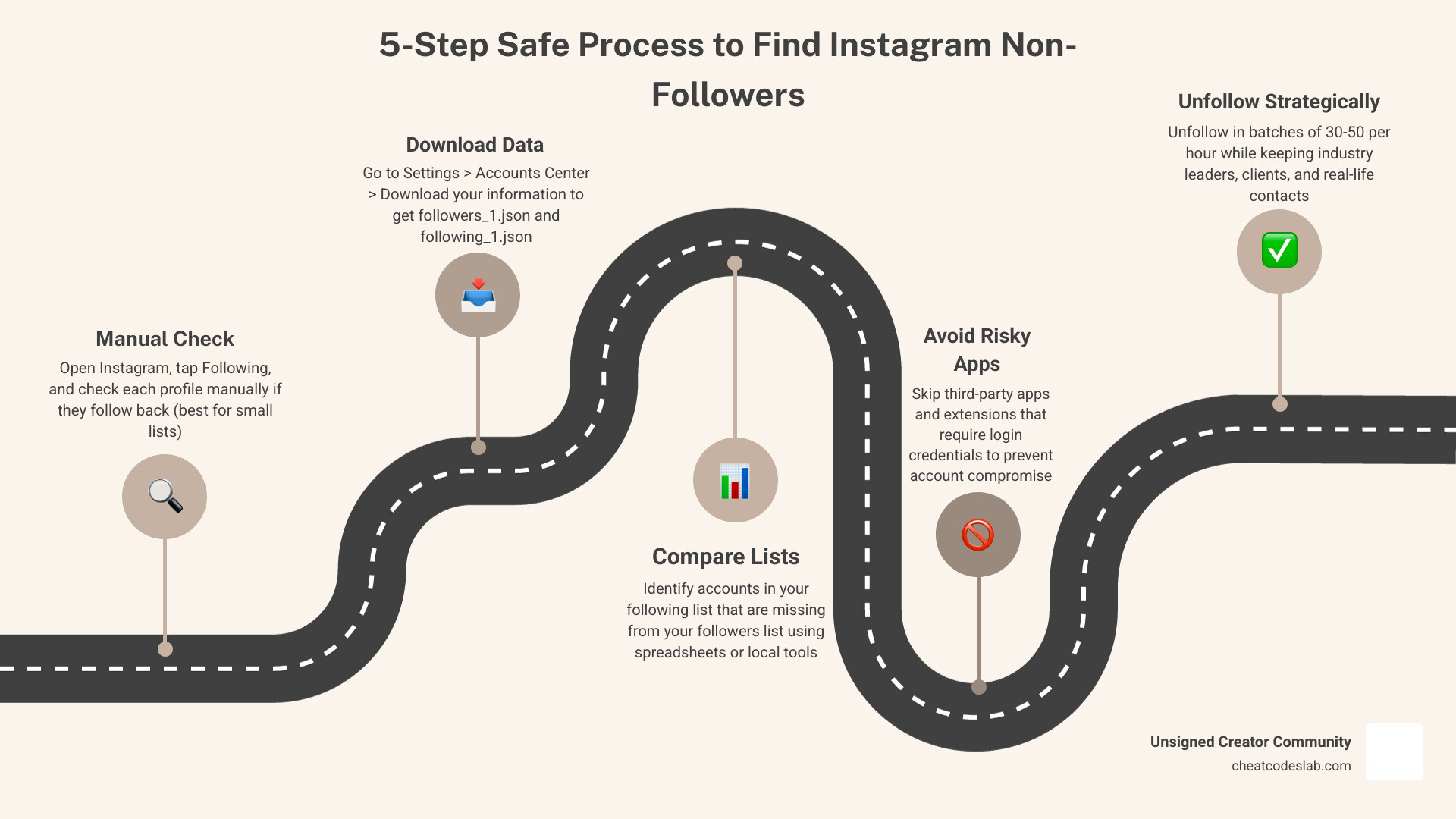
Wondering how to see who doesn’t follow you back on Instagram? Here’s the quick answer:
- Open Instagram and go to your profile
- Tap “Following” to see everyone you follow
- Visit each profile and check if they follow you back (manual method, best for small lists)
- Or download your Instagram data via Settings > Accounts Center > Download your information
- Compare your
followers_1.jsonandfollowing_1.jsonfiles to find accounts in your following list that aren’t in your followers list
No third-party app login required. No password sharing. No risk.
You follow someone. They never follow back. Weeks pass. Maybe months. Instagram doesn’t tell you, and that’s by design.
Since Instagram removed direct follower tracking from its API back in 2018, there’s been no built-in way to see a clean list of who doesn’t follow you back. The app gives you two separate lists – followers and following – but it won’t compare them for you.
That gap is frustrating, especially when your following count is creeping toward 500 and your followers aren’t keeping up. A lopsided ratio can make your account look spammy, and it quietly hurts your engagement rate too – because Instagram’s algorithm factors in how much of your audience actually interacts with your content.
The good news? There are safe, no-login methods that work in 2026, and you don’t need to hand over your password to a sketchy app to use them.
I’m digitaljeff, a content strategist and tech entrepreneur who has spent over 20 years building and scaling social media brands, including helping creators understand how to see who doesn’t follow you back on Instagram as part of a smarter account hygiene strategy. In the steps below, I’ll walk you through exactly how to do it safely, without risking your account.
Quick how to see who doesn’t follow you back on instagram terms:
- Instagram follower growth strategy
- find out who unfollowed you on instagram
- how to hide followers on instagram
How to See Who Doesn’t Follow You Back on Instagram Safely
The safest rule is simple: if a tool asks for your Instagram password, back away slowly like it’s a raccoon in your kitchen.
In 2026, the best methods are still privacy-first:
- manual checking inside Instagram
- Instagram’s official data export
- offline spreadsheet comparison
- browser-based local methods that do not require handing over credentials
Step 1: Manually check a few accounts inside Instagram
This works best if you follow fewer than 100 accounts, or if you only want to check a small group.
How to do it:
- Open Instagram and go to your profile
- Tap Following
- Open one account from the list
- Check whether that account follows you back
- Repeat for the next account
You can also use Instagram’s “Least Interacted With” sorting as a shortcut. It does not show non-followers directly, but it can surface accounts you rarely engage with, which often overlap with one-sided follows.
When this method is practical:
- small personal accounts
- checking a few suspicious accounts
- verifying whether someone recently stopped following
When it is not practical:
- you follow hundreds of people
- you want a complete list
- you value your free time and basic sanity
Research suggests manual checking takes around 5 to 10 seconds per account, so once your following list grows, this becomes a bit soul-crushing.
Step 2: Use Instagram’s official data export to find non-followers
This is the safest and most reliable method because the data comes from Instagram itself.
How to request your export:
- Go to Instagram Settings
- Open Accounts Center
- Tap Your information and permissions
- Choose Download your information
- Request your data in JSON format
- Select connection data if Instagram gives you that option
- Wait for the ZIP file to arrive
Inside the export, you will usually find files like:
followers_1.jsonfollowing_1.json
Your goal is simple: find accounts that appear in following_1.json but not in followers_1.json.
Pros:
- no password sharing
- uses official Instagram data
- more accurate than most scraping apps
- good for medium and large accounts
Cons:
- not instant
- may take some time for the export email to arrive
- file comparison takes an extra step
- exports may not perfectly match live app data if accounts were renamed, restricted, deactivated, or filtered
A few guides explain this process well, including IG Insights on how to see who doesn’t follow you back on Instagram and this safe no-login export guide.
| Method | Best for | Safety | Speed | Accuracy |
|---|---|---|---|---|
| Manual check | Under 100 follows | Very high | Slow | High for spot checks |
| Data export | Full audits | Very high | Medium | High |
Step 3: Compare your followers and following lists without sharing your login
Once you have the export, compare the two lists offline.
The easiest options:
- Excel
- Google Sheets
- a local JSON comparison workflow
- a browser console method that runs on your own device
If you use spreadsheets, convert or import the usernames from both JSON files into two columns. Then compare:
- names in Following
- against names in Followers
Anything missing from Followers is a non-follower.
This is the same privacy-first logic behind this no-login export explanation and this browser-based comparison method.
Why these methods are safer:
- your data stays on your device
- no third-party login
- no handing over your password
- lower risk of compromised account warnings
Browser-based local tools can be useful, but we still recommend caution:
- read exactly what the script does
- avoid anything that sends data to external servers
- do not use bulk automation features
- keep all unfollowing manual
How to See Who Doesn’t Follow You Back on Instagram Without Getting Action Blocked
Finding non-followers is one thing. Unfollowing 300 people in a coffee-fueled rage is another.
Instagram watches action speed, patterns, and account trust. Too much follow or unfollow activity can trigger temporary blocks.
Step 4: Avoid risky apps, extensions, and bulk-unfollow automation
Third-party tools are where most people get into trouble.
Main risks:
- password theft
- “compromised account” alerts
- action blocks
- shadowban-like reach drops
- malware or invasive permissions
- outdated data because Instagram’s API limits have made tracking less reliable since 2018
Safer criteria for any tool:
- no Instagram login required
- local or browser-based processing
- no auto-follow or auto-unfollow
- clear explanation of how data is processed
- no strange permission requests
If you want a broader look at the category, see our guides on the best Instagram follower tracker app and follow and unfollow tools.
A good rule: use tools only to identify accounts, not to perform mass actions for you.
Step 5: Unfollow in batches and keep the right accounts
If you decide to clean up your list, do it slowly.
Based on current 2026 guidance from the research, safer ranges are:
- 30 to 50 unfollows per hour
- 50 to 100 per day for newer accounts
- 100 to 200 per day for established accounts
- 20 to 50 per day if your account has been flagged before
Best practices:
- spread unfollows over several days
- mix activity with normal browsing, likes, and stories
- avoid repetitive, bot-like bursts
- stop immediately if Instagram shows an action block
Also, keep a simple whitelist before unfollowing:
- close friends
- clients
- collaborators
- creators you learn from
- brands you genuinely want to watch
And for real-life contacts you don’t want in your feed? Mute is the diplomatic option. Instagram peace treaty achieved.
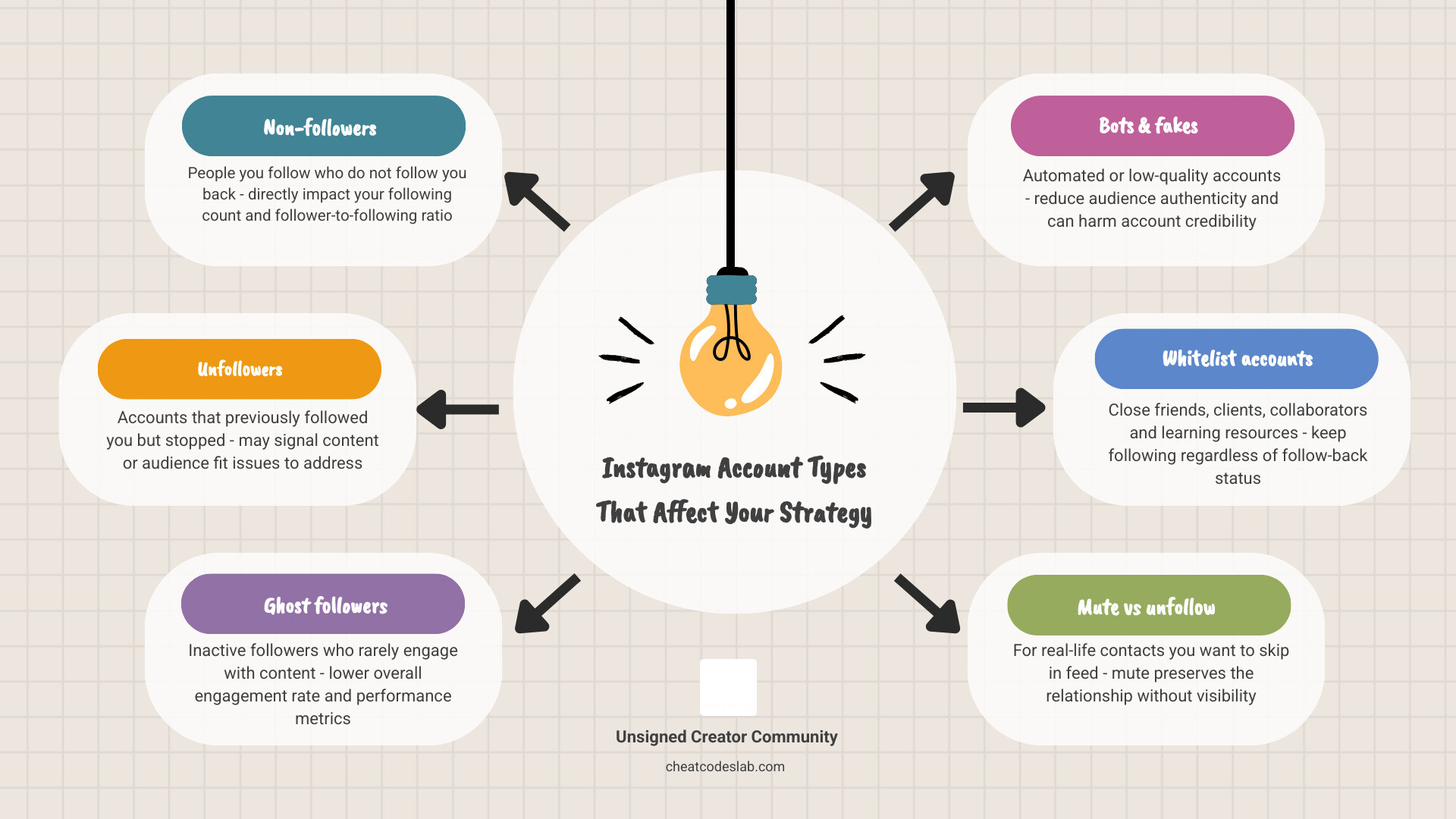
Non-followers vs unfollowers vs ghost followers vs bots
These are not the same thing, and the difference matters for account health.
- Non-followers: people you follow who do not follow you back
- Unfollowers: people who used to follow you, then stopped
- Ghost followers: inactive followers who rarely engage
- Bots: fake or automated accounts, often low quality or spammy
Why this matters:
- non-followers affect your following count and ratio
- unfollowers can signal content or audience-fit issues
- ghost followers drag down engagement rate
- bots can hurt audience quality and make your account look less authentic
For more on recent unfollows, see Find Out Who Unfollowed You on Instagram and our broader guide to Instagram followers.
Build a Smarter Instagram Cleanup Strategy After You Find Non-Followers
A cleanup should improve your strategy, not just soothe your ego for 12 minutes.
Used well, it can help:
- improve follower-to-following ratio
- clean up irrelevant follows
- sharpen feed quality
- focus engagement on accounts that matter
- support stronger community signals over time
Who you should keep following even if they don’t follow back
Do not unfollow everyone blindly.
We usually recommend keeping:
- industry leaders
- niche research accounts
- creators who inspire your content
- potential clients or partners
- close friends and real-life contacts
Why? Because Instagram is not a blood oath of mutual follow-back. Some accounts are useful even if the relationship is one-way.
If their content is valuable but you don’t want the social awkwardness of an unfollow, mute them instead.
When cleaning your list helps your Instagram performance most
Cleanup helps most when:
- your engagement is falling
- your feed is full of irrelevant content
- your following count is much higher than your followers
- you previously used follow-for-follow tactics
- your niche has changed
A periodic audit, every 1 to 3 months, is usually enough. That cadence keeps your account tidy without turning Instagram into a detective hobby.
For more strategy context, we like this 2026 guide to follow-back checking methods and our own guide on apps that actually boost your Instagram following.
Final checklist for a safe non-follower audit
Use this quick recap:
- Check a few accounts manually first
- Request your Instagram data export in JSON
- Compare
followers_1.jsonandfollowing_1.jsonoffline - Never share your Instagram password with random apps
- Avoid bulk-unfollow automation
- Stay in the safer range of 30 to 50 unfollows per hour
- Keep valuable accounts on a whitelist
- Audit monthly, not obsessively
- Remove bots, ghost follows, and irrelevant one-sided follows carefully
If you want to keep improving your account quality after this cleanup, start with our main Instagram followers hub.
At CheatCodesLab, we focus on practical, safe systems for creators and agencies, and this is one of them: keep your data private, keep your actions human, and keep your following list intentional. That’s the real answer to how to see who doesn’t follow you back on Instagram without risking your account.


About the author

How to Archive Posts on Instagram in 4 Easy Steps
Master archiving on Instagram in 4 easy steps to organize your profile and protect your content.

Beginner’s Guide to 10k free instagram followers app
Discover how a 10k free instagram followers app works, its risks, and safe organic growth strategies for real engagement in 2026.
Beginner’s Guide to Best Instagram Report App
Discover the best Instagram report app for real-time analytics, automated reports, and data-driven decisions in 2026.
How to Master Advanced SEO Search Techniques in 7 Steps
Master advanced search techniques in SEO with 7 proven steps to boost rankings, technical audits, and organic traffic.

Cheat Sheet to the Best Business Apps
Discover the best business apps to streamline operations, boost productivity, and scale your business in 2026.

How to Get Instagram Followers Free APK in 5 Steps
Discover how instagram followers free apk 2026 download works and learn safe organic growth strategies instead of risky third-party tools.
Related
Beginner’s Guide to 10k free instagram followers app
Discover how a 10k free instagram followers app works, its risks, and safe organic growth strategies for real engagement in 2026.
How to Master Advanced SEO Search Techniques in 7 Steps
Master advanced search techniques in SEO with 7 proven steps to boost rankings, technical audits, and organic traffic.
How to Get Instagram Followers Free APK in 5 Steps
Discover how instagram followers free apk 2026 download works and learn safe organic growth strategies instead of risky third-party tools.

How to Get 500 Instagram Followers Free
Claim your 500 follower instagram free trial safely and grow your account with real engagement.

How to Get 1000 Instagram Followers Fast
Learn how to get 1000 followers instagram fast with proven strategies, Reels, and profile optimization for real growth in 2026.

Step-by-Step Guide to Download Instagram Followers Pro
Learn how to download Instagram Followers Pro on iOS, Android, and PC with this complete step-by-step guide and safety tips.
