



ChatGPT API tutorial: Ultimate 2025 Guide
Why Every Developer Needs This ChatGPT API Tutorial
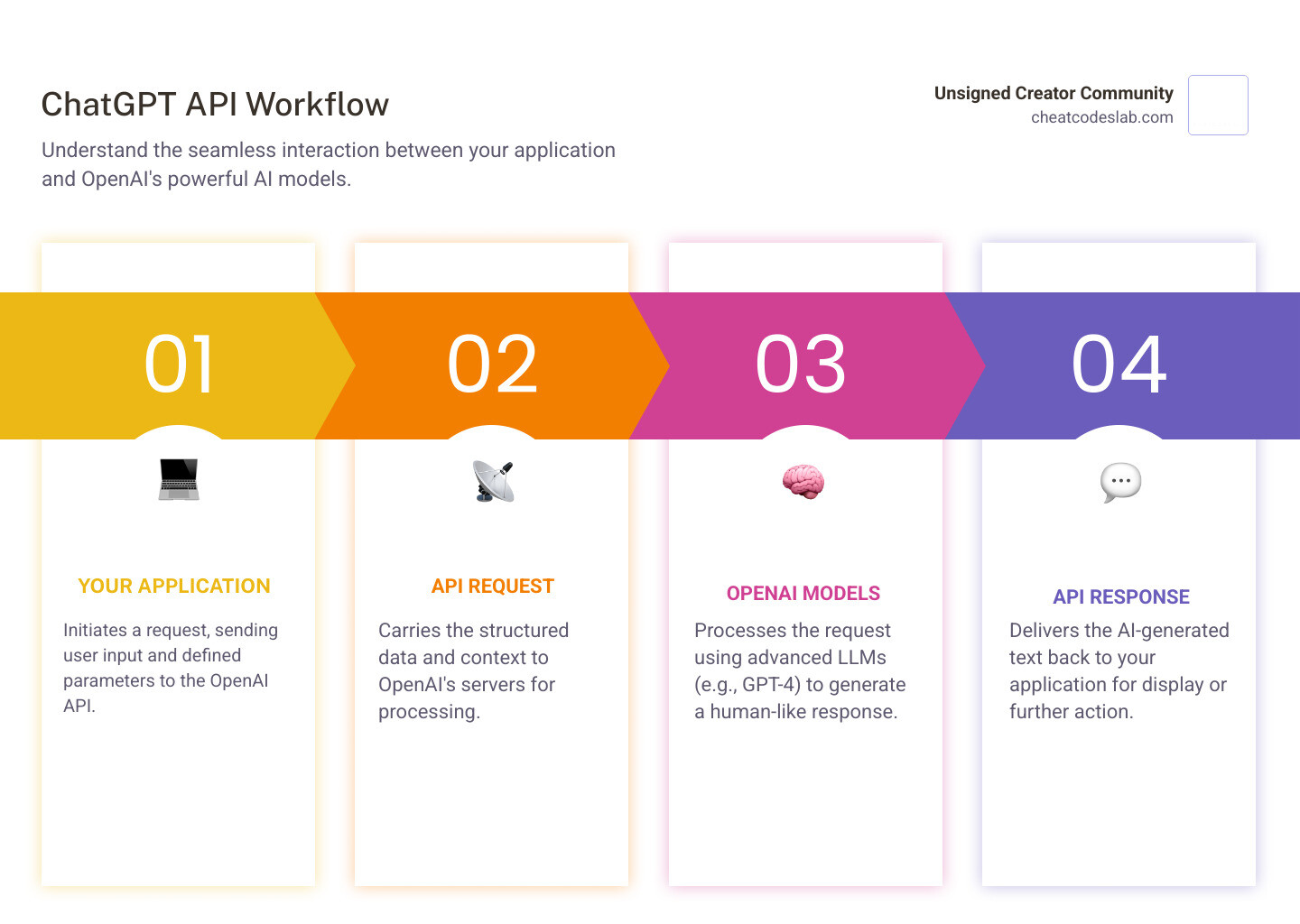
A ChatGPT API tutorial is essential for any developer looking to integrate advanced conversational AI into their applications. The ChatGPT API allows you to harness powerful language models like GPT-4 and GPT-3.5 Turbo directly in your projects, enabling you to build applications that understand and generate human-like text at scale.
Unlike the standard ChatGPT interface, the API offers complete flexibility. You can control the AI’s creativity, define its role, and integrate responses into your workflows. This tutorial will guide you through the entire process:
- Setup: Get your OpenAI account and API key.
- First Call: Install the Python library and make your first request.
- Customization: Learn to tailor responses with parameters.
- Advanced Use: Handle errors and build conversational memory.
Whether you’re building a customer support bot, automating content creation, or developing a virtual assistant, this guide provides the practical knowledge to integrate conversational AI into any application. I’m digitaljeff, and I’ve used these techniques to help top brands scale their content with AI. This guide distills my experience into actionable steps.
The Ultimate ChatGPT API Tutorial: From Setup to First Call
Ready to bring AI into your applications? This section walks you through getting your credentials and writing your first Python code that talks to ChatGPT.

Step 1: Prerequisites and Securing Your OpenAI API Key
Before you code, you need two things: Python 3.7 or higher and an OpenAI account. If you don’t have Python, Download Python from the official site. Then, Sign up for an OpenAI account to access the language models.
Next, generate your API key. This key authenticates your requests. Go to your API keys page and click “Create new secret key.” Copy this key immediately and store it somewhere safe, as you won’t be able to see it again.
Security is critical. Never hardcode your API key directly into your source code. As TechHQ points out, this puts your data at risk. The best practice is to use environment variables, which keep your key separate from your code. For more on this, see our guide on ChatGPT API Key Setup.
Step 2: Setting Up Your Python Project for the API
With your key secured, let’s set up your project. First, create a project directory and a virtual environment. Virtual environments create isolated spaces for each project’s dependencies, preventing conflicts.
Open your terminal and run:
mkdir my-chatgpt-app
cd my-chatgpt-app
python -m venv venv
Activate the environment:
On Windows:
.\venv\Scripts\activate
On macOS or Linux:
source venv/bin/activate
Your prompt should now show (venv). Next, install the necessary Python libraries:
pip install openai python-dotenv
We’re installing openai for API calls and python-dotenv to securely load your API key. A good code editor like Visual Studio Code will make the next steps easier.
Step 3: Your First Python ChatGPT API Tutorial Script
Now, let’s write a script to talk to ChatGPT. Create a file named chat_client.py and add this code:
import openai
import os
from dotenv import load_dotenv

load_dotenv()

openai.api_key = os.getenv("OPENAI_API_KEY")

if not openai.api_key:
    raise ValueError("OPENAI_API_KEY not found in environment variables.")

client = openai.OpenAI(api_key=openai.api_key)

def get_chatgpt_response(prompt_text):
    try:
        messages = [
            {"role": "system", "content": "You are a helpful assistant."},
            {"role": "user", "content": prompt_text}
        ]

        response = client.chat.completions.create(
            model="gpt-3.5-turbo",
            messages=messages,
            max_tokens=150,
            temperature=0.7
        )

        if response.choices:
            return response.choices[0].message.content
        else:
            return "No response generated."

    except openai.APIError as e:
        print(f"OpenAI API Error: {e}")
        return "An error occurred."

if __name__ == "__main__":
    user_input = input("Ask ChatGPT something: ")
    print("
Thinking...
")
    response_text = get_chatgpt_response(user_input)
    print(f"ChatGPT says:
{response_text}")
Before running, create a .env file in the same directory and add your API key:
OPENAI_API_KEY="your_actual_openai_api_key_here"
Remember to add .env to your .gitignore file to avoid committing your key.
This script loads your API key, defines a function to handle the API call, and prompts you for input. Inside the function, we structure a messages array with a system role (to define the AI’s behavior) and a user role (for your prompt). The client.chat.completions.create() method sends the request with key parameters like model, max_tokens (response length), and temperature (creativity). Finally, it extracts and returns the AI’s message.
To run it, make sure your virtual environment is active and execute:
python chat_client.py
You’ve just made your first successful API call! This script is the foundation for more complex applications, like those for AI-driven content creation.
Mastering the API: Advanced Techniques and Best Practices
Now that you’ve made your first call, let’s explore how to customize the API’s behavior, handle issues, and understand its mechanics. This moves your ChatGPT API tutorial knowledge from basic to advanced.

A Deeper Dive into the ChatGPT API Tutorial: Customization and Prompting
The API’s real power is its flexibility. You can fine-tune the AI’s personality, creativity, and output length. Key parameters include:
model: Choose your AI brain.gpt-3.5-turbois fast and cost-effective, whilegpt-4orgpt-4ooffer deeper reasoning.temperature: Controls creativity. A low value (~0.2) gives focused, predictable answers. A high value (~1.0) produces more diverse, creative outputs.max_tokens: Sets the maximum length of the response, helping you control costs and prevent rambling.
Prompt engineering is the art of asking good questions. The messages array is key, using roles to structure the conversation:
system: Defines the AI’s persona (e.g., “You are a friendly customer support agent.”).user: Your question or prompt.assistant: The AI’s previous responses. Including these maintains conversation history for coherent, multi-turn dialogues.
To get better results, be specific, provide examples of the format you want, and define a clear persona for the AI. For more, see our ChatGPT Writing Prompts guide.
Handling Common Errors and Exploring Use Cases
Production-ready applications must handle errors gracefully. Common issues include:
RateLimitError(429): You’re sending requests too quickly. Implement retry logic with exponential backoff (wait 1s, then 2s, 4s, etc.).AuthenticationError(401): Your API key is invalid. Check your.envfile.InvalidRequestError(400): Your request is malformed (e.g., bad parameter). Review your code against the API documentation.
Here’s an improved script that maintains conversation history in a loop:
# Assume client is already initialized as in the previous step

conversation_history = [{"role": "system", "content": "You are a helpful assistant."}]

while True:
    user_input = input("
You: ")
    if user_input.lower() == 'exit':
        break

    conversation_history.append({"role": "user", "content": user_input})

    try:
        response = client.chat.completions.create(
            model="gpt-3.5-turbo",
            messages=conversation_history
        )
        assistant_response = response.choices[0].message.content
        print(f"
ChatGPT: {assistant_response}")
        conversation_history.append({"role": "assistant", "content": assistant_response})
    except openai.APIError as e:
        print(f"API Error: {e}")
        # Remove the last user message to allow retrying
        conversation_history.pop()
This technology is changing industries. Key use cases include:
- Customer Support: AI chatbots like those explored in our AI Tools for Customer Service guide handle routine queries instantly.
- Content Generation: Drafting blog posts, social media updates, and product descriptions.
- Virtual Assistants: Scheduling meetings, summarizing documents, and automating workflows.
- E-commerce: Personalizing shopping with custom recommendations, as shown in our Using ChatGPT for E-commerce guide.
- Education & Code Assistance: AI tutors and pair programming assistants.
Understanding Models, Tokens, and Pricing
To use the API effectively, you must understand tokens, models, and pricing.
Tokens are pieces of words used to measure usage. Roughly, 1,000 tokens equal 750 English words. Your cost is based on the total tokens in your prompt (input) and the AI’s response (output). Writing concise prompts and using the max_tokens parameter helps manage costs.
Models vary in capability and cost. You can always check available models for the latest options.
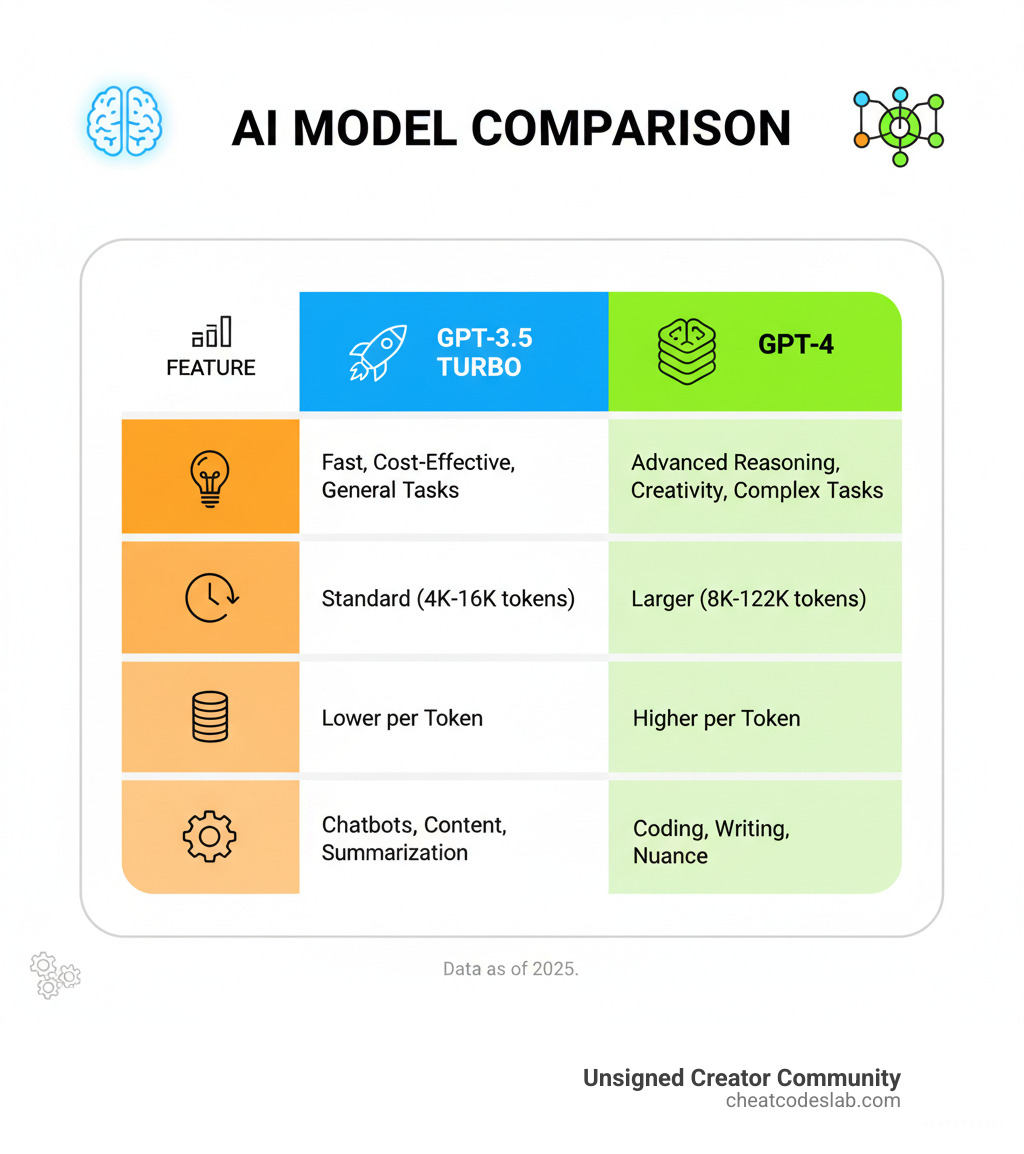
- GPT-3.5 Turbo: The fast, budget-friendly workhorse for most tasks.
- GPT-4: More powerful reasoning for complex problems, but at a higher cost.
- GPT-4o: The latest generation, offering GPT-4 level intelligence at higher speeds and lower costs, with a large context window.
Pricing is per 1,000 tokens and varies by model. Check the official pricing model for current rates. Monitor your usage in the OpenAI dashboard and set spending limits to avoid surprises.
By mastering these concepts, you can build scalable, cost-effective AI applications. At CheatCodesLab, we specialize in certified AI tools for content marketing and SEO. The skills from this ChatGPT API tutorial are your gateway to innovation.
Ready to keep building? Explore more AI Apps and tools and continue your journey with CheatCodesLab!


About the author


Cheat Sheet to the Best Business Apps
Discover the best business apps to streamline operations, boost productivity, and scale your business in 2026.

How to Get Instagram Followers Free APK in 5 Steps
Discover how instagram followers free apk 2026 download works and learn safe organic growth strategies instead of risky third-party tools.

How to Add Swipe Up to Instagram Story Fast by Using Linktree
Learn how to add swipe up to Instagram Story fast using Linktree and link stickers without needing 10k followers.

How to Get 500 Instagram Followers Free
Claim your 500 follower instagram free trial safely and grow your account with real engagement.

Beginner’s Guide to Best Search Engine Optimization SEO
Master best search engine optimization SEO with this beginner's guide covering on-page, technical, and AI strategies for higher rankings.

Ultimate Checklist for Social Media Marketing Agency
Discover the ultimate checklist for choosing a social media marketing agency that drives real ROI and growth.
Related

The Complete Guide to BrightLocal Local SEO
Master BrightLocal local seo with rank tracking, citation management, and review tools to boost visibility in 2026.

The Best AI Tools to Help Nonprofits Get Funded
Discover top AI tools for fundraising to boost nonprofit revenue, donor engagement, and efficiency with predictive & generative AI.

How Machine Learning is Teaching Old Ads New Tricks
Discover how machine learning in digital advertising revolutionizes bidding, targeting, and personalization for superior ROI.

The AI Muse: A Writer’s Guide to ChatGPT
Unlock ChatGPT for writers: Master prompts, beat writer's block, build plots, characters & workflows ethically.

The Robots Are Writing Now and Other AI Content Marketing Software Secrets
Discover ai-driven saas-based content marketing software secrets. Boost SEO, scale workflows, and dominate 2026 trends now!

Ghost Murmur CIA
Ghost Murmur: The Quantum Blueprint for the Impossible Deep inside a fortified bunker in Tehran, an American soldier is breathing—and the CIA is watching that breath through a solid lead wall using a technology that technically shouldn’t exist. This isn't just a scene from a Tom Clancy novel; it’s the frontline of what CIA Director William J. Burns calls the "Technological Mission Center," a pivot where the agency is prioritizing quantum sensing to regain the edge in denied areas. We have officially entered the era of the Quantum Cold War, where physical barriers like concrete and distance are becoming obsolete. As the U.S. government pours $1.8 billion into the National Quantum Initiative to ensure "quantum supremacy," the line between hard science and the supernatural is blurring before our eyes. If you’re a solopreneur or a creator, you need to […]
