



Automate SEO Reporting to Save Your Sanity
The Real Cost of Manual SEO Reporting (And How to Fix It)
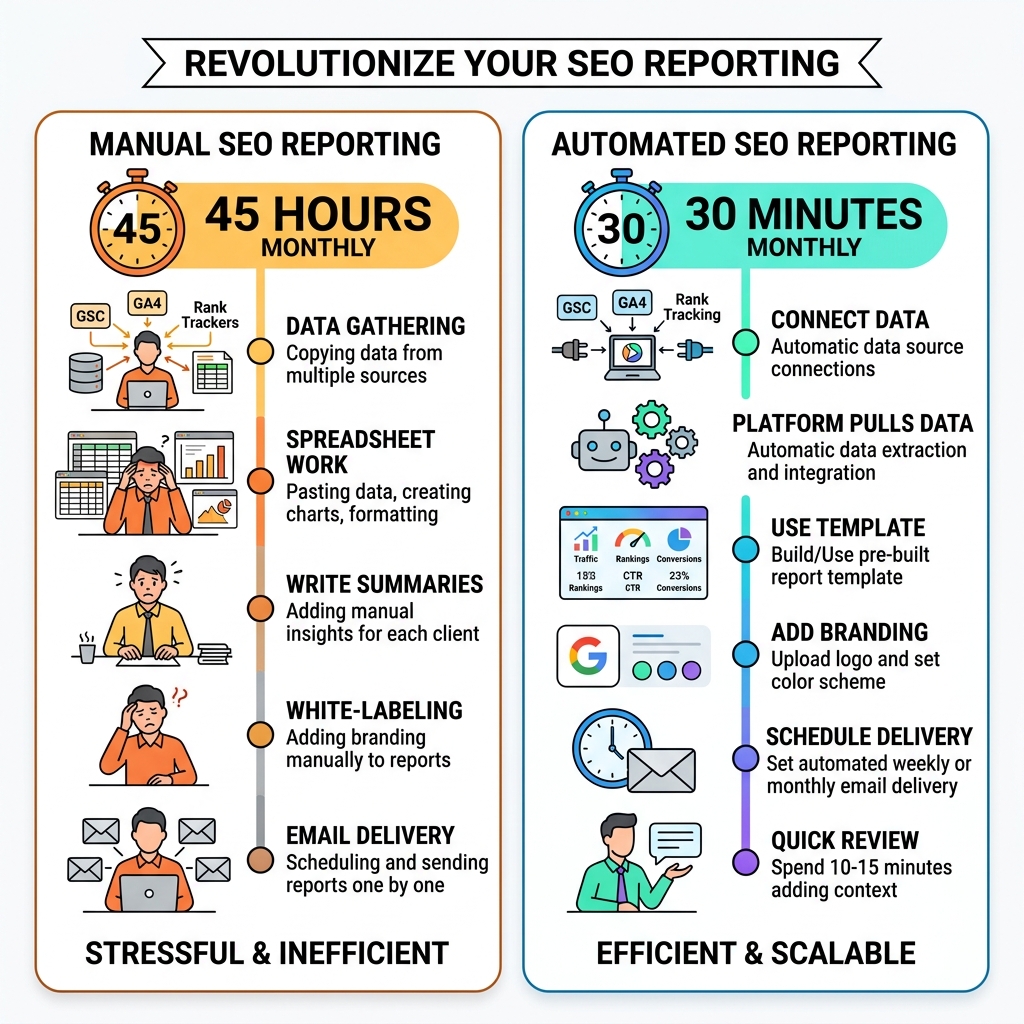
Automate SEO reporting and you can cut your monthly reporting time from 45 hours down to just 30 minutes.
Here’s how to do it:
- Connect your data sources – Link Google Search Console, Google Analytics 4, and any rank tracking tools to a reporting platform
- Choose a reporting tool – Use a professional reporting platform or a data visualization tool that pulls data automatically
- Set up a template – Build or use a prebuilt report template with your key metrics (traffic, rankings, CTR, conversions)
- Add your branding – Upload your logo and set your color scheme for white-label reports
- Schedule delivery – Set weekly or monthly automated email delivery to clients or stakeholders
- Review before sending – Spend 10-15 minutes adding context and insights before the report goes out
If you run an SEO agency or manage multiple clients, you already know the pain. Every month, you’re copying data from Google Analytics, pasting it into spreadsheets, formatting charts, and writing summaries — for every single client. It eats hours you don’t have.
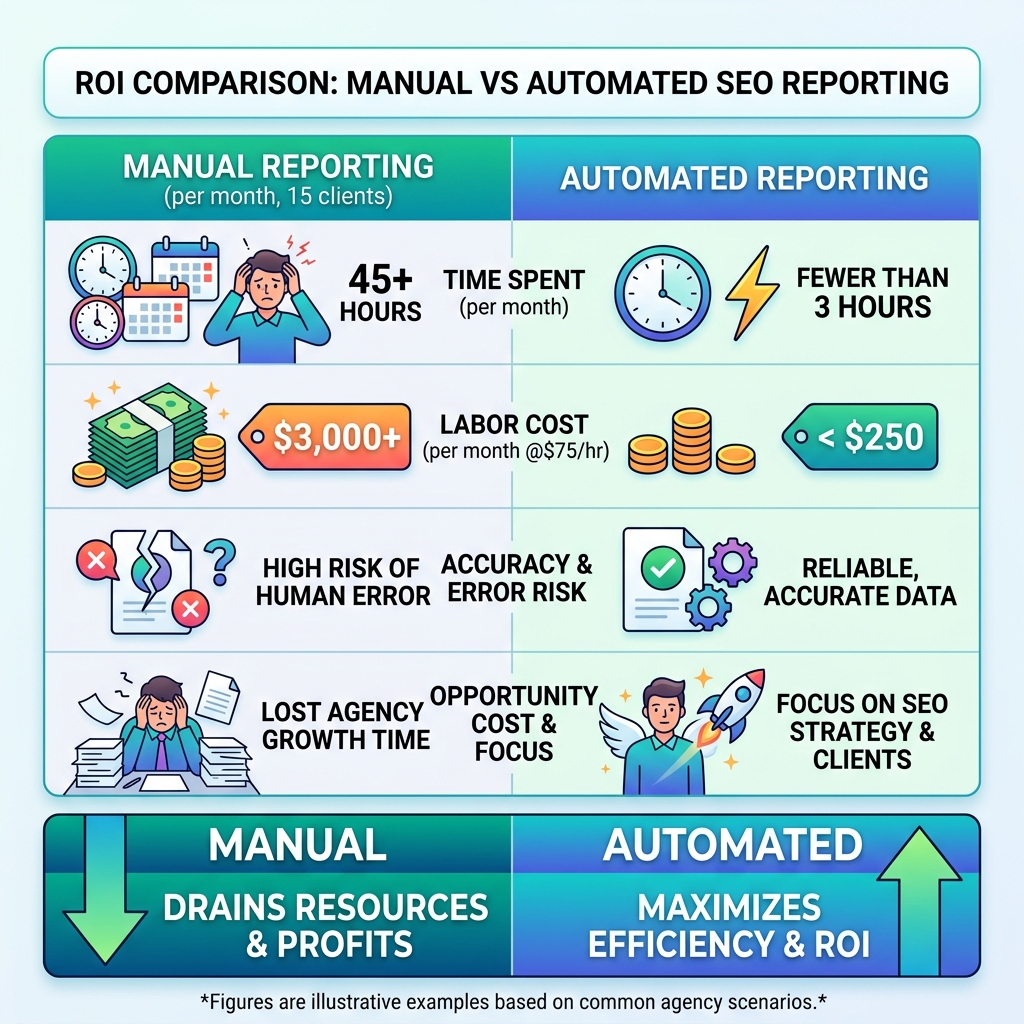
The numbers are eye-opening. The average agency spends 12 to 15 hours per month creating client reports. For a 15-client agency, that adds up to 45 hours monthly — more than a full work week, just on reporting. At a $75/hour labor rate, that’s over $3,000 every month spent on tasks that don’t directly move the needle for clients.
The good news? Most of that work can be automated.
Modern SEO reporting tools connect directly to your data sources and generate polished, accurate reports on a schedule — no manual data entry required. The result is more time for actual strategy, and better reports delivered to clients faster.
I’m digitaljeff — a tech entrepreneur and content strategist who has spent 20+ years building and scaling digital brands. I’ve personally seen how the right systems to automate SEO reporting can free up entire work weeks and help agencies scale without burning out their teams. Let’s break down exactly how to set it up.
Automate seo reporting terms to know:
Why You Must Automate SEO Reporting in 2026
If we’re being honest, manual reporting isn’t just boring; it’s a silent killer of agency growth. When we spend our time wrestling with CSV exports and Excel pivot tables, we aren’t spending time on the creative strategies that actually improve our clients’ rankings. In 2026, the gap between agencies that use an automated seo platform and those that don’t is becoming a canyon.
The financial drain is the most obvious reason to switch. Research shows that manual SEO reporting costs agencies roughly $3,375 monthly for a 15-client portfolio. That is $40,500 annually—essentially the salary of a junior employee—spent just on moving data from point A to point B. By choosing to automate seo reporting, that cost drops by over 90%, saving upwards of $3,150 every single month.
Beyond the money, there is the “sanity” factor. Manual data entry is prone to human error. One misplaced decimal point or a copied-and-pasted date range from the wrong month can destroy client trust. Automation provides “executive intelligence”—clean, visual data that makes you look like a pro while ensuring the numbers are 100% accurate every time.
Key Metrics for Your Automate SEO Reporting Workflow
A report is only as good as the data inside it. To truly automate seo reporting effectively, you need to pull from the most reliable sources. We always recommend starting with the “Big Two”: Google Search Console (GSC) and Google Analytics 4 (GA4).
- Organic Clicks and Impressions: These are your bread and butter. GSC provides this data, though keep in mind there is usually a 3-4 day delay in their reporting.
- Click-Through Rate (CTR): If your impressions are high but clicks are low, your meta titles need work. Automated reports highlight these anomalies instantly.
- Striking Distance Keywords: These are keywords ranking in positions 11–20. They are on the verge of greatness! Tracking these allows you to prioritize content updates that offer the highest ROI.
- Backlink Profile: Monitoring the evolution of your backlinks helps you detect spam attacks or celebrate successful outreach.
- Conversion Rates: At the end of the day, traffic is a vanity metric if it doesn’t lead to sales or leads. Integrating GA4 allows you to show exactly how organic search is padding the client’s bottom line.
For more details on building a robust system, check out our automated seo platform guide.
The Role of AI in Modern SEO Automation
AI has changed reporting from a “look back” at what happened to a “look forward” at what should happen. Modern tools use AI for anomaly detection—if your traffic drops by 20% overnight, the system alerts you before the client even notices.
AI summaries are another game-changer. Instead of you spending an hour writing a summary of the month’s performance, AI can analyze the data modules and draft a narrative that explains the “why” behind the numbers. It handles data harmonization, taking messy figures from different sources and smoothing them into a unified story. Predictive analytics can even forecast where a client’s traffic will be in three months based on current trends.
To stay ahead of the curve, see our seo ai tools guide for the latest in machine learning applications.
Step-by-Step Guide to Setting Up Your Automated Reports
Setting up your first automated report might feel daunting, but it’s actually a “set it and forget it” process that takes less than an hour.
- Data Integration: Start by connecting your APIs. Most reporting platforms have a one-click “Connect” button for Google services. This allows the tool to reach into GSC and GA4 to pull real-time data.
- Template Selection: Don’t reinvent the wheel. Use a prebuilt template designed for SEO. These usually include sections for traffic evolution, top-performing pages, and keyword distribution.
- White-Labeling: This is where you make the report yours. Upload your agency logo and set the brand colors. This ensures that when the client opens the PDF, they see your brand, not the software’s.
- Live Dashboards vs. PDFs: We love giving clients a live, read-only dashboard link. It provides full transparency and lets them check stats whenever they want, reducing those “how are we doing?” emails.
How to Choose the Right Tool to Automate SEO Reporting
The “best” tool depends on your technical comfort level and the size of your client list. If you’re a data nerd, you might prefer building custom dashboards in a data visualization platform. It’s highly customizable, though it has a steeper learning curve.
For agencies that want a more “plug-and-play” experience, specialized SEO reporting software offers polished interfaces and automated insights out of the box. If you’re managing millions of keywords across hundreds of sites, you’ll want an enterprise-grade platform that offers low API latency and SOC 2-ready security controls.
For a deeper dive into the specific features to look for, visit our automated seo reporting tool guide.
Customizing Reports for Client Branding
Client communication is an art. A report filled with technical jargon like “canonical tags” and “LCP scores” will just confuse a business owner. The goal of your report should be to translate data into a story they understand.
Use white-label features to include custom logos and color schemes that match your agency’s identity. More importantly, use the “narrative insights” section. A great automated tool will provide a space for you to add a human touch—a brief summary explaining that the traffic dip was due to a seasonal holiday or that the spike in impressions came from a new blog post.
Learn more about how to personalize your workflow in our ai seo automation section.
Scheduling and Delivery Best Practices
Timing is everything. We generally recommend monthly reports for long-term strategy and weekly summaries for high-growth startups or aggressive campaigns.
- Daily Alerts: These should be internal-only. You don’t want to blow up a client’s inbox every time a keyword moves two spots.
- The Human-in-the-Loop: Never set a report to go directly to a client without you seeing it first. Spend 10 minutes reviewing the automated draft, adding a few sentences of context, and checking for any data anomalies. This “human-in-the-loop” approach ensures the client still feels the personal value you provide.
- Stakeholder Alignment: Make sure the report is going to the right people. You can usually add multiple recipients, so both the marketing manager and the CEO stay informed.
Avoiding Common Automation Pitfalls
While we love automation here at CheatCodesLab, it isn’t a magic wand. “Blind automation”—where you never look at the data—is a recipe for disaster. If a site goes down for four days, an automated report might just show a “traffic drop.” Without your strategic oversight to explain why it happened and how you fixed it, the report looks like a failure rather than a proactive save.
Another pitfall is ignoring data lag. As mentioned, GSC data is often 3-4 days behind. If you run a report on the 1st of the month for the previous month, the last few days of data might be missing or incomplete. Always account for this when setting your date ranges.
Finally, ensure your search engine monitoring is consistent. If you change your tracking parameters mid-month, your automated reports might show “ghost” drops or spikes that aren’t real. Consistency in your automated seo platform setup is key to long-term accuracy.
By following these steps, you aren’t just saving time—you’re building a scalable, professional agency that can handle double the clients with half the stress. Your sanity (and your profit margins) will thank you.


About the author


How to Archive Posts on Instagram in 4 Easy Steps
Master archiving on Instagram in 4 easy steps to organize your profile and protect your content.

Beginner’s Guide to 10k free instagram followers app
Discover how a 10k free instagram followers app works, its risks, and safe organic growth strategies for real engagement in 2026.

Beginner’s Guide to Best Instagram Report App
Discover the best Instagram report app for real-time analytics, automated reports, and data-driven decisions in 2026.
How to Master Advanced SEO Search Techniques in 7 Steps
Master advanced search techniques in SEO with 7 proven steps to boost rankings, technical audits, and organic traffic.

Cheat Sheet to the Best Business Apps
Discover the best business apps to streamline operations, boost productivity, and scale your business in 2026.

How to Get Instagram Followers Free APK in 5 Steps
Discover how instagram followers free apk 2026 download works and learn safe organic growth strategies instead of risky third-party tools.
Related
Beginner’s Guide to Best Instagram Report App
Discover the best Instagram report app for real-time analytics, automated reports, and data-driven decisions in 2026.
Cheat Sheet to the Best Business Apps
Discover the best business apps to streamline operations, boost productivity, and scale your business in 2026.

The Ultimate Guide to AI Generated SEO Content Tools
Master ai generated seo content with proven tools, Google guidelines, and GEO strategies that boost rankings and drive real results.

The Complete Guide to 1k Followers App
Discover how a 1k followers app can help you reach TikTok Live and boost Instagram growth fast with safe, organic strategies.
The Ultimate Guide to Best Local SEO Tools
Discover the best local seo tools to boost visibility, manage citations, and optimize your Google Business Profile in 2026.

Backlink Building Tool Survival Guide
Discover top backlink building tool strategies: Compare Ahrefs, Semrush, AI outreach like Linkee, free options, and penalty recovery tips for 2026 SEO success.
